
Business Online Banking

With Business Online Banking, you can manage your accounts, move money, and streamline daily operations—securely and efficiently, from anywhere.

Lake Ridge Bank Logo Top

Anytime, Anywhere Business Banking—On Your Terms

Business online banking gives you 24/7 access to powerful, easy-to-use tools that help you manage your business wherever work takes you.

Checkmark

Flexible Access

Use any device to bank securely, anytime.

Checkmark

Real-Time Overview

See balances and transactions at a glance.

Checkmark

Quick Navigation

Instantly access bill pay, transfers, and more.

Checkmark

Paperless Billing & Statements

View bills and documents online, all in one place. (Watch eDocuments demo)

Checkmark

Custom Alerts

Get notified about key account activity.

Checkmark

Advanced Security

Control employee access with flexible permissions.

Checkmark

Smart Integrations

Connect with mobile, e-commerce, and imaging tools.

Checkmark

Local Support

Get help from bankers who know your business.
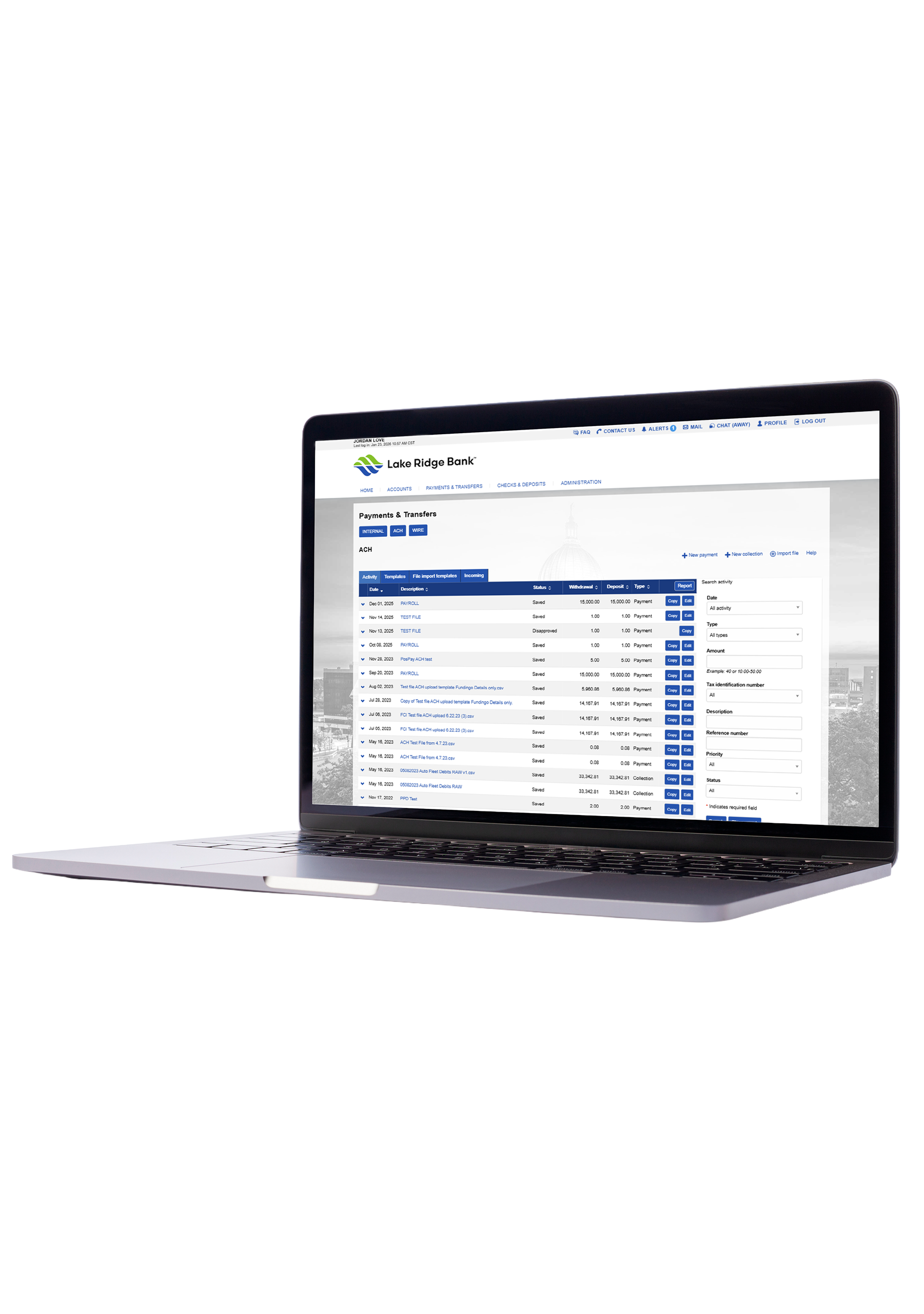
Try Our Demo
Business ACH Desktop

Business Banking, Simplified

Auto Loans

Online Bill Pay

Take the hassle out of paying bills. With Bill Pay, you control when and how payments are made, all from one secure platform. Fewer logins. More convenience. Your schedule, your way.

Explore Bill Pay
Mortgages

Remote Deposit Capture

Deposit checks from your office with ease. eCourier lets you securely scan and transmit check images—saving you trips to the bank and streamlining your cash flow.

See How It Works
Money Transfer

Account Alerts

Stay in the know with real-time account alerts. Get notified instantly about key activity—like low balances, large transactions, or suspicious charges—so you’re always one step ahead.

View Alert Options
Savings

Business Mobile

Bank wherever business takes you. With our mobile app, you can manage accounts, approve transactions, and stay connected—right from your phone.

Go Mobile

New to Online Banking?

Frequently Asked Questions

Can I schedule recurring internal transfers?

Yes. During the transfer setup, select “Recurring” and choose your frequency and duration.

How do I cancel a scheduled internal transfer?

Go to “Transfer Activity,” find the scheduled transfer, and select “Cancel.”

Can I set up mobile alerts?

Yes. In the mobile app, go to ‘More’ > ‘Alert Setup’ to configure notifications.

How do I enroll in Business Online Banking?

Contact a Business Banker or your Lake Ridge Bank Personal Banker at (608) 223-3000. We’ll help you choose the right plan and service level for your business.

Can I use mobile banking if I’m enrolled in Business Online Banking?
Yes. Download the Lake Ridge Bank Business Mobile App from the App Store or Google Play.

Banknotes Blog

View All Posts
Professional speaking to client

Making Banking Easier: Why Managing Investments In-House Matters

There are many factors to consider when choosing the right team to protect your finances and grow your net worth. One little-discussed factor that could play a role in the decision is whether your team
Read Post
Wisconsin School of Business - Family Business Center and Lake Ridge Bank

Mixing Business with Family: Connect with the Wisconsin Family Business Center

Beginning in 2018, the TV series Succession became a cultural phenomenon that appalled viewers with the antics of the Roy family as four siblings vied for control of their aging father’s company, worth billions of
Read Post
business man looking at reports

Market Report: June 2026

Alternative Reality Several years ago, an alternate history television series aired called The Man in the High Castle. The series depicted a dystopian world set in 1962 after the Germans and Japanese supposedly won World
Read Post

CEO Insights: Seven Ways Community Banking Aligns With Common Values

I hear it often: “Aren’t all banks basically the same?” From the outside, I understand why it can feel that way. But as we recently marked Community Banking Month, I found myself reflecting on how
Read Post